Track commercial activity in CRM
The CRM module brings together your company's organizations, contacts and commercial opportunities. It helps you track exchanges, tasks and sales forecasts.
10.1 Organizations, contacts and opportunities
- Open
CRM → Organisations, then Nouvelle organisation. Choose its type — prospect, customer, partner or buyer — and enter the relevant contact details. Include its legal identifier when known. - In Contacts, select Nouveau contact and link the person to the organization. Only mark marketing consent when you have that consent.
- In Opportunités, select Nouvelle opportunité, or use Créer une opportunité on a tender. Set the title, organization, amount and currency, stage, probability and expected closing date.
- Open the opportunity to review its context and original notice. Record exchanges with Ajouter une activité and deadlines with Nouvelle tâche. Recording an email activity creates a CRM entry; it does not send an email.
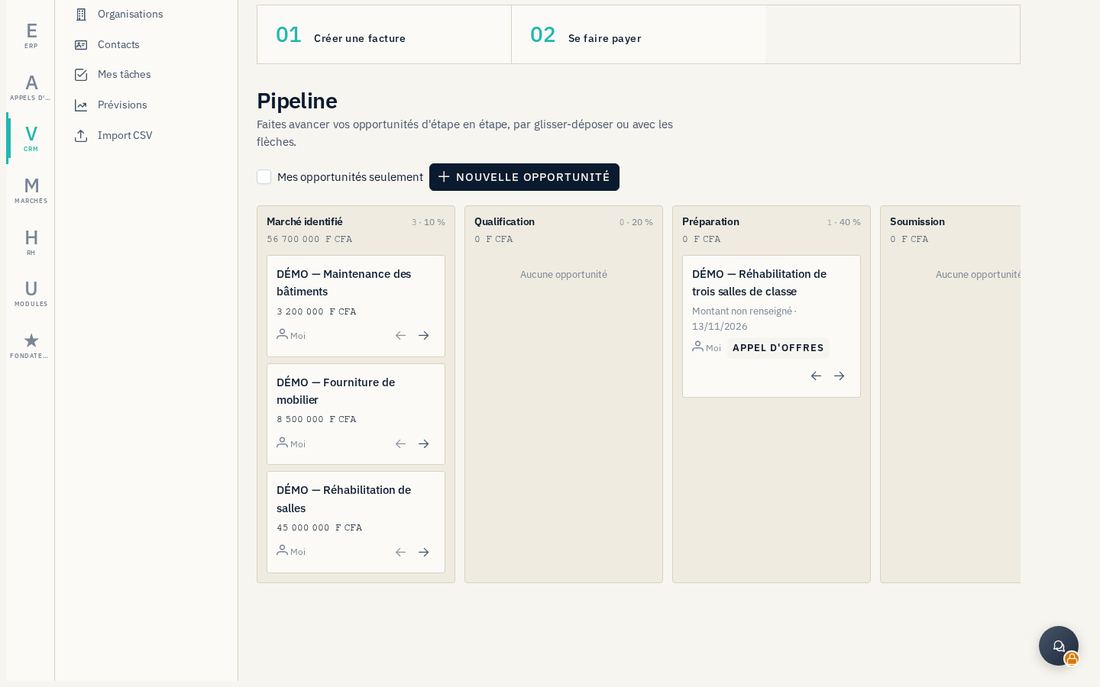
10.2 Pipeline, tasks and forecasts
In Pipeline, move an opportunity by dragging it or using the arrows. Its detail page also offers Changer d'étape. A lost stage requires a reason; reassignment to another owner is reserved for managers. In Mes tâches, review overdue, upcoming or undated items, then Marquer faite once the action has actually been completed.
Prévisions groups open opportunities by expected closing date. Weighted amounts depend on the amounts and probabilities entered. A won opportunity does not automatically create a contract, invoice or receivable; prepare and document those records in their respective modules.
10.3 Import contacts and find an ERP customer
Import CSV also accepts XLSX files: select organizations or contacts, check recognized columns, then click Importer. The displayed limit is 5 MB and 5,000 rows; only the first XLSX worksheet is read. Review the report and errors before repeating an import.
On an organization, Lier au client ERP lets you enter an existing customer identifier or search by name and create a customer if necessary. Carefully check the identity and matching result. The link helps you continue in the ERP; it does not create an invoice or establish the customer's creditworthiness.