Prepare a Collateral dossier
Marchés → Garanties (/marches/garanties) brings together dossiers, evidence, checks, proposed assets and declared security interests. Use it to prepare the documents needed to review a guarantee and track its deadlines. Documentary preparation does not constitute a bank guarantee or perform any legal formality.
13.1 Gather documents and review checks
- In Dossiers, choose Nouveau dossier, then Depuis un contrat (From a contract) or Dossier libre (Standalone dossier). Check type, amount, currency and counterparty before Créer le dossier. Information copied from a contract is a snapshot to review.
- In Pièces, use Déposer une pièce, choose its category, then Ajouter. The limit is 20 MiB. Declared values — amount, date, issuer — are values you enter after reading the document; its contents are not automatically certified.
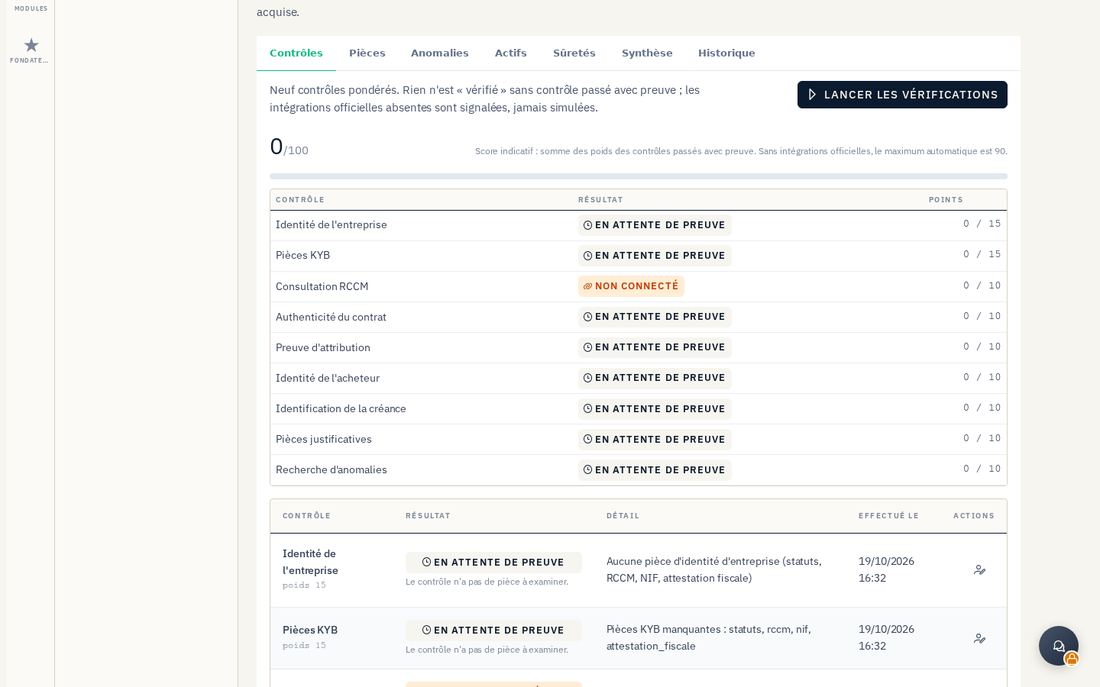
- In Contrôles, click Lancer les vérifications. Read each result and the integrations marked Non connecté. A favorable Revue manuelle requires supporting evidence and human judgment.
- In Anomalies, correct inconsistencies and document their resolution. After changing documents, rerun checks and review the last check date before using the score or summary.
13.2 Assets, security interests and deadlines
In Actifs, Proposer un actif describes a receivable, stock, equipment or another asset with its estimated value and valuation basis. Préparer l'envoi au module Sûretés prepares the transfer; while the integration is marked as disconnected, no actual transfer takes place.
In Sûretés, Déclarer une sûreté records the asset, beneficiary, deadline and formalities. Tracking states — envisaged, constituted, registered, enforceable against third parties, released — are recorded in the prescribed order; certain transitions require evidence and a registration reference. These labels describe documented declarations in the dossier, without performing or certifying external formalities.
Review Alertes for deadlines, missing documents and anomalies; Acquitter an alert does not complete the corresponding formality. Demander la mainlevée records a release request for tracking. Synthèse and Exporter en JSON prepare material for human review; Historique retains recalculations.