Financing, on the company side
Financing module in the left rail. The principle: you do not fill out a bank's form — you back a request with what your ERP already knows (invoices, history, inventory), and the platform assembles the file.
3.1 Requesting financing
Two possible entry points: the « Demander un financement » (Request financing) button on a customer invoice's record, or Financement → Mes demandes → Nouvelle demande.
- The invoice — choose the one that carries the request. The screen shows the amount, what remains due, and what is available for financing (the remaining due amount minus what other facilities already draw on). If the invoice cannot carry a request, the screen states it with its reason: already paid, cancelled, still a draft, no customer, or already fully financed.
- The amount — by default, the available amount; you can request less, never more. The currency is inherited from the file.
- The product — factoring, reverse factoring, inventory-backed financing… depending on what partner institutions offer, including, where the institution offers it, interest-free commission Islamic finance products.
- The banks — check the institutions in your network to send the file to. Nothing is checked by default and nothing goes out without your action; « Sélectionner toutes les banques éligibles » (Select all eligible banks) is a convenience, not a broadcast mode.
- The competition mode — RFQ (one or more named recipients, the normal regime) or competitive tender, if you prefer to put several banks in open competition on the same file.
- Send. The file is frozen at the moment it is sent: this snapshot is what each bank reads, never your live accounting. Each institution receives the file in an isolated space; none sees that you have approached the others.
3.2 Tracking your requests
Financement → Mes demandes lists your files with their status, the condition precedents still open, the messages exchanged with each institution, and the documents submitted — each item knows who submitted it.
- Open the file you want.
- Check which banks have opened it and when, and any information requests they have made.
- Reply to a request for additional information directly from the file's message thread.
If the invoice changes after it is sent — amount, due date, debtor, cancellation — a banner flags it on the file, and the banks that received it are informed. The platform notes the change; it draws no consequence from it on your behalf.
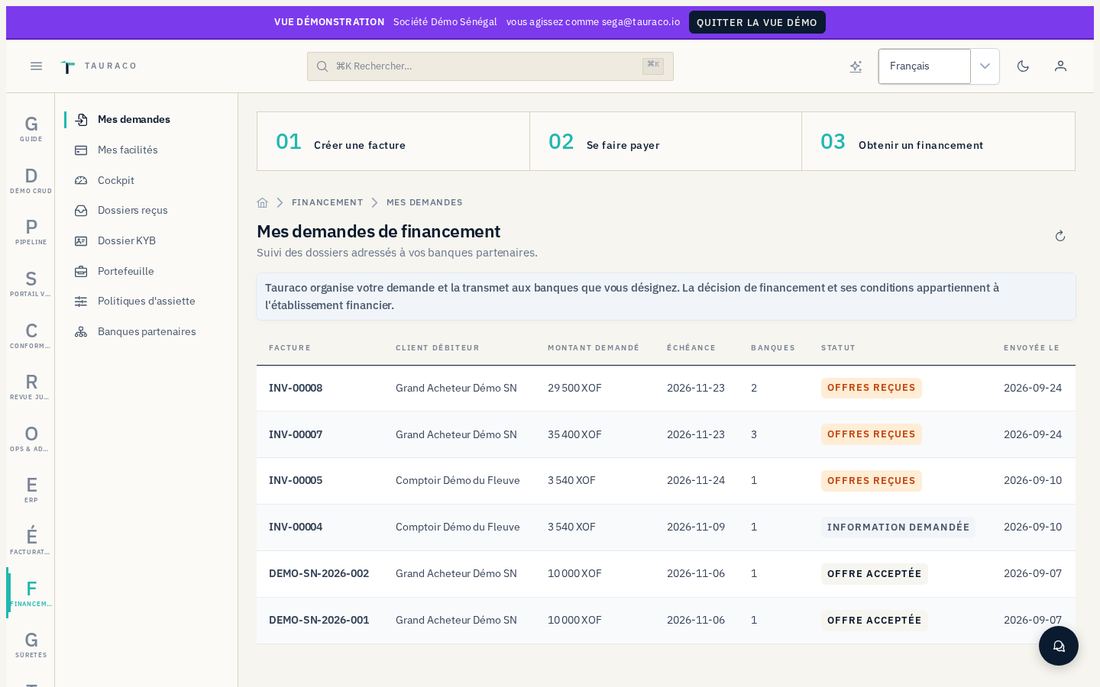
3.3 The analysis shown in full transparency
On your own file, you always see the analysis exactly as the bank consults it: the grade, the score, an expected probability and delay, a summary and the detail of the deductions that built that summary, as well as the payment history that feeds it.
3.4 Comparing and accepting an offer
Offers received are shown side by side, in order of arrival. Each carries structured conditions entered by the bank: rate, advance rate, fees, validity period, and free-text conditions.
- Open the file, scroll down to the offers received.
- Compare the amount, structured conditions, and free-text conditions. The "remaining to finance" column shows what would remain available after acceptance, if a bank offers less than the amount requested.
- Click « Accepter » (Accept) on the chosen offer, then confirm.
Upon acceptance, the exact version of the offer is locked, the other offers are set aside, and the banks concerned are informed.
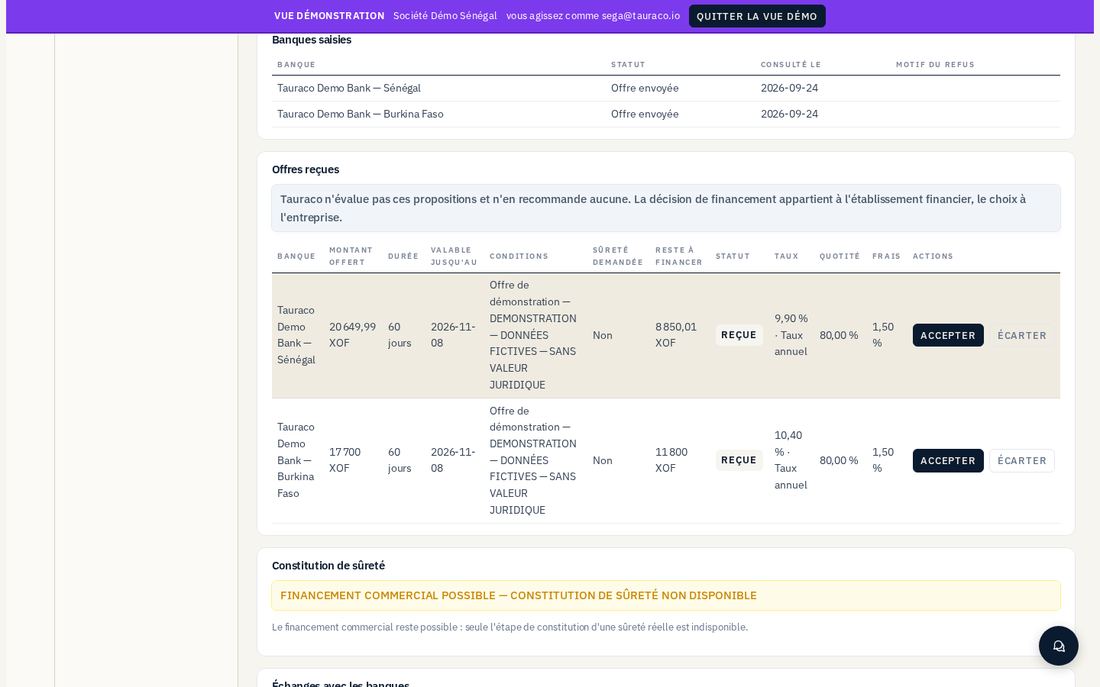
If the chosen offer assumes a real security interest and the legal framework for the country is not yet validated for that regime, the screen shows "Financement commercial possible — constitution de sûreté non disponible" (Commercial financing possible — collateral perfection unavailable): the financing itself is not blocked, only the collateral-perfection step is closed, with the reason shown.
3.5 Your facilities, drawdowns, and repayment schedules
Financement → Mes facilités shows your active credit lines: ceiling, outstanding balance, what you can still draw down line by line, and the repayment due dates (principal, margin or fee, charges).
- Open the facility in question.
- Check what is available before requesting a drawdown.
- Request a drawdown — it is subject to the bank's decision (see §4).
If your facility is backed by inventory
The institution calculates a borrowing base from your eligible inventory: retained value (the lower of cost and market), minus the haircut, multiplied by the advance rate. What lowers this borrowing base is shown reason by reason in the file: a count that is too old, an unapproved warehouse, a quantity reserved for sale, a lot already pledged, third-party custody required but absent. If the outstanding balance exceeds the borrowing base, a deficiency opens with a cure deadline, visible on your side as well as the institution's.
3.6 Accepting an institution invitation
An institution can invite you (or one of your collaborators) to join its space.
- Open the link received by e-mail — whether you are already signed in or not.
- Create your account or sign in if you already have one.
- Accept. The invitation token is single-use and expires after a period set by the institution.
3.7 After acceptance: disbursement and repayment
Tauraco never disburses funds. Disbursement belongs to the bank, and the file moves to "financed" when the bank confirms it with its operation reference. When the invoice is settled by your customer, the file moves to "settled" — this settlement does not amount to a release of any collateral, which remains in place until its cancellation is proven.