The company workspace and module access
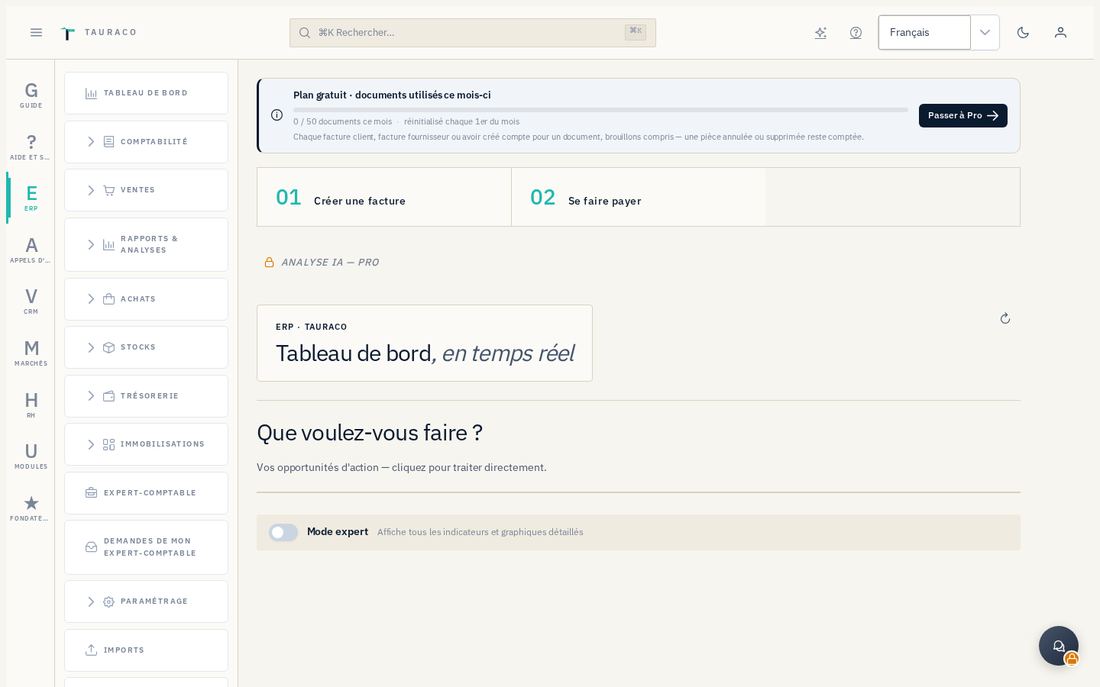
The company workspace gives you access to Appels d'offres (Tenders), CRM, Marchés (Contracts) and RH (HR). Depending on your permissions, you can track commercial opportunities, prepare bids, manage contracts and organize teams. Screenshots are illustrative examples with no contractual value. French button labels are retained where useful to identify the illustrated screens.
8.1 Opening a module
- Open
https://app.tauraco.ioand sign in with your personal account. Links beginninghttps://tauraco.io/app/…or/espace/…also give access to the application's modules. - From the menu, choose Appels d'offres (Tenders), CRM, Marchés (Contracts) or RH (HR). Each module opens in your company's context, with your account's permissions.
- From a public notice, Préparer mon offre avec Tauraco opens its preparation workflow. If sign-in is required, complete it and resume the requested notice. Opening a link does not send any application to a bank.
8.2 Understand missing or denied access
Four things are distinct: the company's subscription, the entitlements included in that subscription, module activation and your role within the module. A subscription does not automatically allow every employee to edit a record. Granting a role does not purchase a paid plan.
An authorized administrator opens the Modules module in the rail (/parametres/modules; entries Flags, Audit log, Analytics), then Accorder un accès (Grant access), and selects the user, module and role. Retirer l'accès removes that membership. Drapeaux de fonctionnalités controls the activations available for the company; it does not replace subscription entitlements or bank authorizations. Journal shows recorded actions and Analytique, where accessible, presents module usage.